![[image]](Frigcal1024.png)
This page documents the releases of the Frigcal app, from newest to oldest:
For Android, the Google Play store notifies users about updates to the app. Check this page for updates to PC, source-code, and Android sideload packages, as well as change details that apply to all platforms.
Quick links: 1.6 images and video
4.4.0 refines existing functionality on all platforms. It trims in-app Help on Android to save memory and avoid pauses; makes scrolling more fluid in event notes on PCs; shows matched-text excerpts instead of calendar names in Search results; and prevents invalid inputs. All of this app's packages—Android, Windows, macOS, Linux, and source code—have been updated for these changes, which are described in more detail by the following:
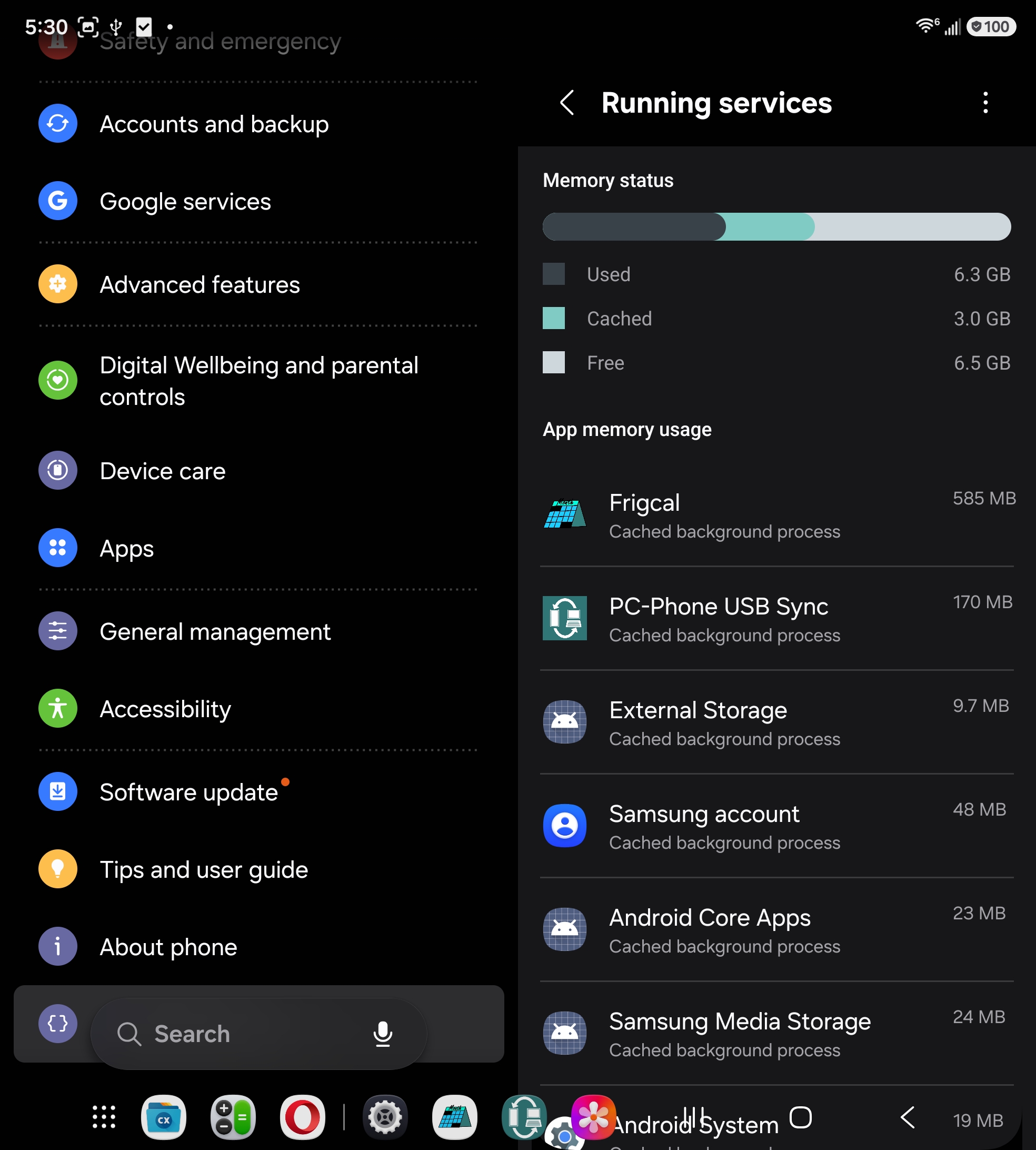
Details: Due to performance issues in the GUI library used by this app, viewing the former complete Help text incurred substantial memory and speed penalties. Memory usage could explode to a size that varied by screen and font size but could reach a severe 2G in extreme cases. Moreover, the app suffered unannounced pauses when loading or redrawing Help text that varied by phone speed but could last several seconds on slower devices and might have triggered ANRs. Both of these approached bad-behavior thresholds imposed by the Play store but were also poor user experience in general.
By trimming in-app Help, both memory and pause issues have been eliminated or greatly reduced, at the minor cost of routing phone users to the online version of the overview for the complete usage story. With Help loaded, memory now tops out at roughly 500M in normal usage, and pauses now typically peak at 1 second on slower phones. In-app Help is trimmed only on Android, not on PCs, which generally have enough memory and speed to make Help's performance issues trivial. On Android, the trimmed Help is enough to get started and includes links that make it easy to find more help online.
Details: Each excerpt in search results shows the first line in the event that matched the search term. For single-field searches (e.g., Title), the excerpt is the first or only matched line in the searched field. For All searches, the excerpt is the first matched line in the concatenation of all fields searched, with Title checked first because it is usually shortest, followed by the Note field and then Category and Calendar.
Related: All number fields in Settings now also prevent input of invalid negative numbers
by ignoring the - sign character in inputs. A negative input for maximum
backups, for instance, makes no sense and might throw off the app.
4.3.1 is a minor patch release for all platforms that includes a single enhancement:
the Title field of event edit and add dialogs now line-wraps its text so it is
easier to view on narrow displays. Title is still meant to be a short, one-line
summary of an event, but the new wrapping better accommodates constrained
screens on phones and small windows on PCs. See the
before
and
after
screenshots.
To maintain uniform spacing, Title is still displayed as a single line that
is scrolled
instead of wrapped in both the Month screen and event-list dialog.
Because of this, any explicit newlines added to a Title are automatically
converted to spaces on input to avoid run-together in Month and event lists.
Title is line-wrapped only in event dialogs, to avoid cumbersome cursor navigation
for a user-input field.
This change has no impact on prior screenshots, videos, or documentation.
This update has both new functionality and improvements, and is a recommended upgrade for all users on all platforms. It includes a one-tap Copy/Cut mode for faster event repeats and moves, a top-of-screen save button for easier change checks and saves, Paste and Quit options for convenience, and more. Videos and screenshots were updated for 4.3.0's changes.
The following list details 4.3.0's changes, with items that apply to all platforms unless labeled otherwise:
Month
screen.
To make these actions quicker, the new Settings-screen item
One-tap Copy/Cut eliminates a step for
both.
Specifically, this mode:
Copy tap, instead of
requiring an Exit tap
Cut tap, instead of
requiring a Confirm tap in a verification popup
This new mode is enabled by default because event repeats and moves are
both very common operations. It can be disabled in Settings, however,
because it sacrifices utility for Copy—events cannot be edited further
after the copy without re-opening them with a tap, though this is a rare use case;
and it removes a verification guardrail for Cut—inadvertent cuts
proceed silently, though the event dialog closes and the cut event is saved in a
buffer and may be pasted back into the still-highlighted day.
* preceding
the Save Calendars action in the main
menu.
This is still present but requires opening the menu to check for changes that may require a save.
To avoid a step, an additional, transient, and more prominent icon button is now displayed at the top left corner of every screen when a save is advised. This button has an icon that resembles a disk drive and appears whenever there are unsaved calendar changes. Tapping it saves all calendars with changes just like the main menu's save, and removes both button and menu indicator until the next change. The net effect better alerts you to unsaved changes and avoids one menu-open tap or pull per check or save.
Paste button to paste the most-recently copied or cut
event on the tapped day. This button is a redundant convenience: it works the
same as a longpress on a day's number, which is still available and is
required for pastes in days without events. You may, however, find Paste
to be useful if you inadvertently single-tap a day number, if not easier in general.
As before, follow up with Save to add an event pasted by either
longpress or Paste.
Quit App action that closes the app when
selected but first verifies the close if there are unsaved calendar changes. On PCs,
this is the same as clicking the window-close ("x") button, but on Android, it offers
a way to exit that may be quicker than closing the app in Recents (e.g., by Back plus
Recents swipe) and is safer than Recents closes that ignore unsaved
changes. While
redundant with other closes, this action provides an alternative that's
platform-neutral and safe.
Save button now more intelligently checks
for field changes and does not flag a calendars change if no fields have been
modified. Hence, Save for edits is equivalent to Exit when no
changes have been made to the event, and simply closes the event.
This update has both new functionality and fixes, and is a recommended
upgrade for all users on all platforms.
It includes a Cut button that speeds event moves, pause instead of close
on Android Back, faster search-result scrolls on PCs, and GUI improvements
and bug fixes.
The following list details 4.2.0's changes, with items that apply to all platforms unless labeled otherwise:
Cut button. This button acts like a
Copy + Del (delete)
combo, but saves one tap in the common event-move use case. It's still confirmed
as for Del, but it avoids having to also tap Copy for a
later longpress paste of the cut event.
As part of this addition, the event-edit dialog's former Update,
Delete, and Cancel were shortened to Save,
Del, and Exit, respectively, to save horizontal
space, and Create became Save in the event-add dialog to match.
Deletion (now Del) was retained to allow you to remove without erasing a prior copy,
and Copy is still available for event repeats via pastes.
Month screen.
In paused mode, the app remains in memory and may be quickly resumed in Android
Recents
without calendar reloads. This is the same state that arose formerly
for Android Home and Recents taps while using the app.
Pause mode is convenient but consumes memory. To close the app in full and reclaim its memory for use by other apps, close the app in Recents as usual (e.g., by Back tap and Recents tap and swipe, or by Recents tap and swipe). Android Back is also no longer ignored when a dialog is open: the dialog simply stays open during the pause.
Important: Back no longer warns about unsaved calendar changes, because
it no longer closes the app. As before, the app has no way to warn about unsaved
changes when it's closed in Recents, so take care when performing such
closes: check the changes indicator at the main menu's Save Calendars
(or the top-of-screen indicator in 4.3.0+).
On PCs, the app still warns about unsaved changed on close requests, but this
same caution applies to PC forced closes. There is no auto-save in this app
because it could preclude abandoning unwanted changes.
Help and About
screens,
including colors that better call out salient points.
For example, cautions now appear with bold red to alert users, and
orange text replaces underlines where appropriate. Colors used are all
readable in both light and dark themes.
Cancel button in action confirmation dialogs
has been relocated to the right side of the
dialog.
This commonly crops up on event-edit Cut, Del, and
Quit with changes.
Settings
screen
are displayed with the
same friendlier format as in load and save confirmations: replacing hex escapes
returned by Android (%3A and %2F) with their
equivalent characters (: and /). These paths are
content
URIs
required by Android's proprietary Storage Access Framework, not portable POSIX
pathnames.
Search
screen's
results list has been increased to be the same as that of the Help and
About screens. This is particularly useful when there are many results and you
want to skip ahead to another month or year. For finer-grained control of
scrolls, use a press-and-move gesture. Android scrolls were already fast.
Month screen. Although category names in new events added in
the app can be color names only, this use case can arise when using calendars created
in other calendar programs, including unconverted Frigcal 3.0
calendars.
Save in the Settings
screen
after leaving a numeric input field empty there. Instead, such empty fields are
filled with their preset defaults post edits, and an info popup alerts the user.
These fields also now restrict their inputs to digits 0-9, but they can
be left empty after user edits.
This update includes both new functionality and fixes, and is a recommended upgrade for all users on all platforms:
Save Calendars option in the main menu now shows a
* prefix whenever there are unsaved calendar-file
changes.
This lets you check for changes by simply opening the menu to look for
this indicator, instead of either running a save to trigger the no-changes
message or closing the app to trigger the unsaved-changes warning.
(See also the later top-of-screen changes indicator button of 4.3.0).
Calendar field of the event
dialog
may be now prefilled with a sole or default filename, to help you save a step.
This works by trying the following options in turn:
Default calendar
field of the Settings screen, and that default file exits,
use it to prefill calendar in the event dialog, but also open a
calendar-selection list on calendar-field taps for other choices.
The net effect avoids calendar-selection steps on event adds if you either
use just one calendar or store most events in a calendar set as the default in
Settings. The Settings default is not applied to
events copied and pasted into other days, because pastes should initially
retain all field values; simply tap to select a different calendar if desired.
Calendar prefills also do not count as a change for verification when closing
the edit dialog.
Month screen and event-list dialog.
combine-calendars.py, which
may be run to combine multiple calendars into a single calendar. It
creates a new ICS file in a new folder that contains all the events
among all ICS files in an existing calendars folder. If you've used
multiple calendars in the past, this can simplify some operations
going forward, including the prior update's prefills. Read more
here and look for this tool
both online and in the
tools folder of PC installs, and read its top-of-file docs
for usage info.
._calendar.ics files
in the calendars folder are now skipped. These files, known as AppleDoubles,
can crop up when manually copying calendars to a FAT or exFAT drive on
macOS for use on other platforms.
They do not contain calendar content and it is harmless to skip them.
They were formerly skipped with failure messages in load-confirmation dialogs,
but are now ignored silently.
Month
screen
are now automatically reset
to be unscrolled when navigating to a different month or loading calendars
from a different folder. Formerly, scrolls of days' events in a prior month
were retained after navigations and loads, even though they were irrelevant
to new months' events.
Frigcal 4.0.0 is a fully redesigned calendar app, with a new UI, seamless Android support, and broad PC portability. Like its predecessors, it still stores calendars in ICS files that maximize transparency and portability. This first release is thoroughly vetted and functionally complete and is available in the following forms:
While additional enhancements and repairs are normal and expected to appear over this app's lifetime, its 4.0.0 release is already robust and fully usable on all supported platforms.
For more on the app in 4.0.0 and later, see its user guide and demos. For download links, see the abbreviated Downloads or the complete App Packages.
While this app's 4.X line has an all-new UI and much-improved Android support, its genesis lies in calendar-processing tools hashed out by the legacy Frigcal program from Sep-2014 through Dec-2024, in versions 1.0 through 3.0.
The legacy Frigcal was also created by this app's developer and used the Tkinter library for its GUI. It worked on all PC platforms as well as Android, but on Android it did not build a standalone app and relied on other apps and their permissions to run its source code (see the former guide for running 3.0 on Pydroid 3).
The new 4.0.0 Frigcal uses the same ICS files as the legacy Frigcal and some of its calendars-processing code but uses Kivy library and stack for its GUI to provide a standalone app on Android that delivers a much more seamless user experience. As before, the new app also works the same on all PC platforms.
Frigcal legacy users: the new 4.0.0 Frigcal's event-color model is not backward compatible with the legacy versions' configuration-files scheme. This is by design, to avoid configuration-file syncs across devices. For help converting legacy color settings to 4.0.0's new model, please see the conversion script.
Watch this page for news about future releases. For info on using the app in general, see the User Guide.